A Simple Tokyo Train Map for Tourists
Tokyo's full railway map covers JR lines, Tokyo Metro, Toei Subway, and several private railways on one crowded diagram. Flex Railway Map lets you turn off the lines you don't need, so you can look at a map that only shows what matters for your trip.
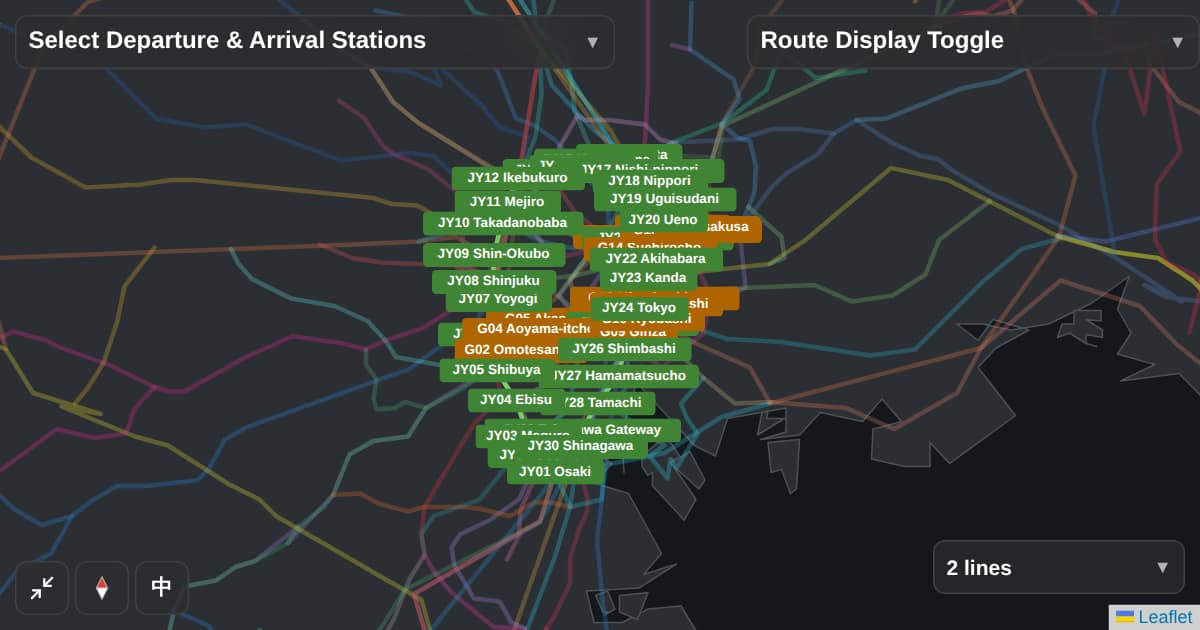
Opens with only the JR Yamanote Line and Tokyo Metro Ginza Line shown, in English. You can add or hide other lines from the list on the map.
The button below opens the map with just these two lines shown
Why Tokyo's train map looks so complicated
Tokyo is served by many different operators, and many stations are shared by several lines. A standard map tries to show all of it at once, which is exactly why first-time visitors find it hard to read.
Show only the lines you actually need
With Flex Railway Map, you choose which lines are visible. For a typical sightseeing trip, the JR Yamanote Line (the loop line connecting most major areas) and the Tokyo Metro Ginza Line (one of the oldest and most central subway lines) already cover a lot of ground.
Use the button below to open a map with just those two lines shown.
A map for understanding the network, not for step-by-step directions
Flex Railway Map isn't trying to replace a route-finding app that tells you which platform to stand on. It's built for a different moment: when you want to actually see how the lines relevant to your trip connect, before you start moving.
Opens with only the JR Yamanote Line and Tokyo Metro Ginza Line shown, in English. You can add or hide other lines from the list on the map.
Frequently Asked Questions
- Can I show all the lines at once?
- Yes. You can turn every line back on from the line list on the map at any time. Starting with just a couple of lines and adding more as you need them is usually the easiest way to read the map.
- Can I choose which lines are shown?
- Yes. You can toggle each line on or off individually, or enter a departure and destination station and Flex Railway Map will select the lines relevant to that trip for you.
- Does this work on my phone?
- Yes, Flex Railway Map works in any modern browser on phone, tablet, or desktop. No app install is required.